Questions
Questions:
Can we access the implied volatility surfaces of illiquid assets to price real options
Are these volatility surfaces updated on regular basis even though the underlying assets are sticky in nature
Approach
Approach:
Option volatility surfaces are available for contracts traded on exchanges.
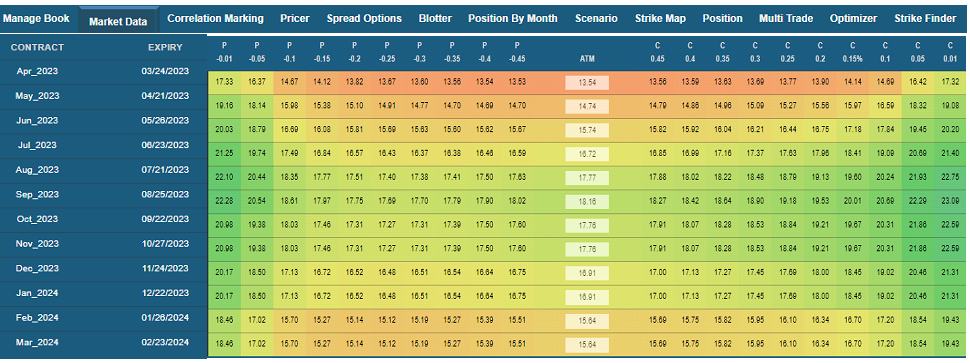
In many cases the assets invested in are not traded on exchanges, but they have optionality embedded in the risk. To value such risk, it is essential to create volatility surfaces for illiquid assets using a synthetic approach
The contract volatility surfaces are initially populated using a joint distribution of volatility surfaces based on the composition of the indices.
These compositions are daily rebalanced and thus the volatility surfaces are updated every day. All surfaces are marked on delta space which can be later converted into % moneyness or strike space.
Operations
Few things about the current code run environment:
Runs on Python 3.7.9
- Package version required: (if other versions are used, the code many result in errors)
- Pandas == 1.1.3
- PyPDF2 == 1.26.0
- tabula-py == 2.4.0
- Java needs to be installed in the system where the code is run (tabula-py package uses java internally)
Parameters in the code to be defined:
- Create a folder to save the downloaded pdfs from the VEX EOD reports website and define it under the global variable INPUT_DIR in the code.
- Create a folder to save the extracted csv files and define it under the global variable OUTPUT_DIR in the code.
- The prefixes used for the pdfs are defined in the PREFIX_CHAR global variable at the top.
- For VEX008: use a name such as USDAPORKBELLY008
Steps to execute the code daily:
- Download the pdfs from - https://www.ve-x.co and save them in INPUT_DIR location defined above.
For VEX008: Select VX008 in the dropdown - Update the date in the “main” block of the python code to whatever date the pdf needs to be extracted.
- Run the python code (Open command prompt, navigate to the code location, type “python optionsdata_adm.py” in the command prompt and press ENTER.
- Once the code runs successfully, the extracted CSVs should be available in OUTPUT_DIR folder defined above.
Interface